
A Trusted Buyer of Unused Diabetic Supplies
Before requesting a quote from My Diabetes Guru, please locate the expiration date and, if applicable, the product reference (REF) number on your diabetic supplies. These details help us verify your products and provide you with the most accurate payout.
The expiration date is typically printed on the side, top, or bottom of the product box, depending on the manufacturer.
For Dexcom G7 and Dexcom G7 15-Day Sensors, you can find both the REF number and the expiration date printed on the side of the box. Be sure to include the correct REF number when requesting your quote to help us identify your product.
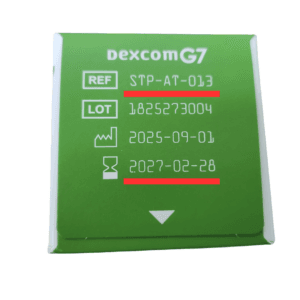
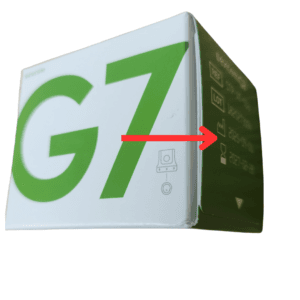
For FreeStyle Libre 2, Libre 3, and Libre 14-Day Sensors, the expiration date is generally located on the bottom of the box. Double-check the printed date before submitting your supplies for a quote.
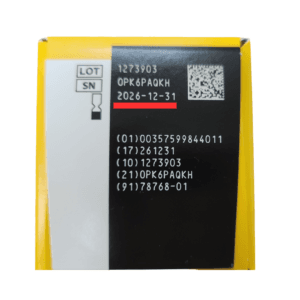
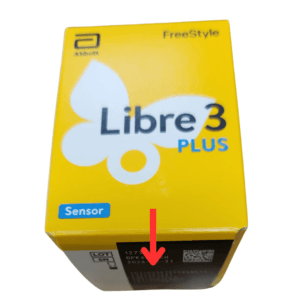
To calculate the remaining shelf life of your diabetic supplies, we count the current month as Month 0, the following month as Month 1, and continue from there.
For example, if the current month is August (Month 0) and your supplies expire in May, they are considered to have 9 months of remaining shelf life.
This is the same method we use when determining your payout. Supplies with longer expiration dates generally qualify for higher offers, while products that are closer to expiration may receive a lower quote. Our pricing is always based on the product type, condition, and remaining shelf life.
If you’re unsure where to find the expiration date or REF number, our customer support team is always happy to assist you.
Sell your unused diabetic supplies today with My Diabetes Guru and enjoy competitive payouts, free shipping, and a simple selling experience.
Turn your unused diabetic supplies into cash. Get a fast and fair quote from our team today.
Fill out the form below and our team will contact you.